Building a digital twin to monitor office environment
Using latest tools including Cursor AI, docker compose, VPS, Open BIM, and IoT cloud API.
BIM
Cole Siu
1/24/20261 min read
Project Structure```
Signify_Bim_App/
├── main.ts # Frontend entry point
├── server.js # Backend Express server
├── config.ts # Frontend configuration
├── .env # Environment variables
├── docker-compose.yml # Docker orchestration
├── Dockerfile.frontend # Frontend container definition
├── Dockerfile.backend # Backend container definition
├── docker-start.sh # Docker deployment script
├── nginx.conf # Nginx production config
└── public/
└── myoffice.frag # 3D model
Features
🏢 3D BIM Viewer
Interactive 3D model visualization using That Open Components
- Fragment-based model loading (.frag format)
- Camera controls and model manipulation
- Area highlighting and navigation
- Transparent material rendering for better visibility
📊 Real-Time Data Integration
Area Occupancy Tracking: Live occupancy status for 6 office areas
Indoor Air Quality (IAQS) Monitoring: CO2, temperature, humidity, and other air quality metrics
- Energy Analytics: Lighting energy consumption visualization with interactive doughnut chart
🐳 Docker Support
- Full containerization with Docker and Docker Compose
- Automated build and deployment scripts
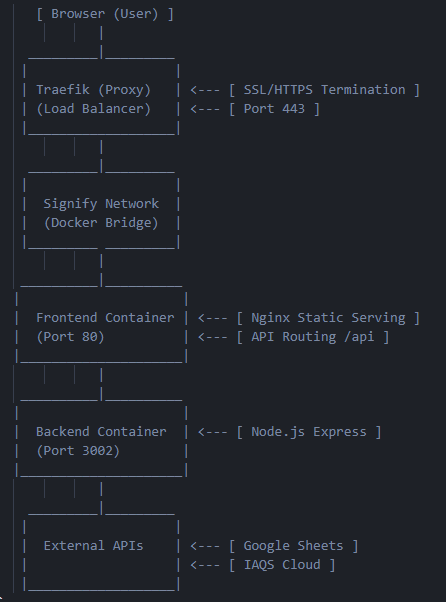
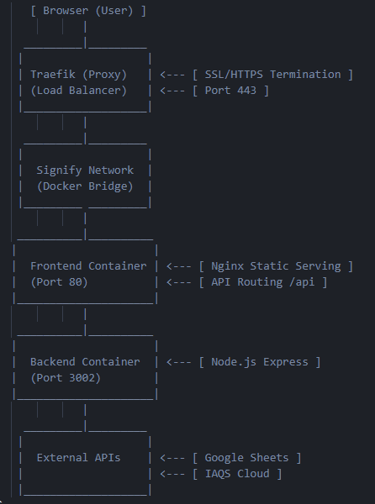
- Traefik & Nginx reverse proxy configuration for secure production
- Automated HTTPS/SSL certificate management via Traefik
- Environment variable-based configuration for security
colesbimapp.cloud 👈 Go to the BIM app
Building a digital twin on your own has been made possible with the latest advancements in IoT cloud, open BIM, and AI tools. In this project, I have built an IoT BIM App to monitor my office environments. I used Cursor AI for coding, Docker Compose for server containers setup, and Open BIM for 3D modeling in the browser. The app is deployed on a VPS using Traefik for loadbalancing, security hardening, and status monitoring. Live data gets from IoT cloud APIs.